
TL;DR: Bạn đang dùng nhiều AI APIs (Gemini, Claude, OpenAI)? CLIProxyAPI Dashboard giúp quản lý tất cả trong một giao diện - tự động xoay vòng credentials, real-time analytics, và chỉ cần một endpoint duy nhất.
Vấn đề: Quản lý AI API keys phân tán
Nếu bạn là developer làm việc với AI, chắc đã gặp:
- Nhiều providers: Gemini cho image, Claude cho reasoning, OpenAI cho embeddings...
- Mỗi provider một cách auth: OAuth, API key, service account
- Khó track usage: Không biết tháng này tốn bao nhiêu token
- Phải đổi code khi switch provider hoặc hết quota
CLIProxyAPI Dashboard là gì?
CLIProxyAPI Dashboard là một open-source proxy server + dashboard quản lý, cho phép:
- Gọi 7+ AI providers qua một endpoint duy nhất
- Tự động xoay vòng credentials khi hết quota
- Real-time analytics: token usage, chi phí, request logs
- Hot-reload config - thay đổi không cần restart
Tech stack: Go (Gin), Single-page HTML dashboard, Docker-ready.
GitHub:
- Dashboard: github.com/0xAstroAlpha/cliProxyAPI-Dashboard
- Core Proxy: github.com/router-for-me/CLIProxyAPI
Kiến trúc hoạt động
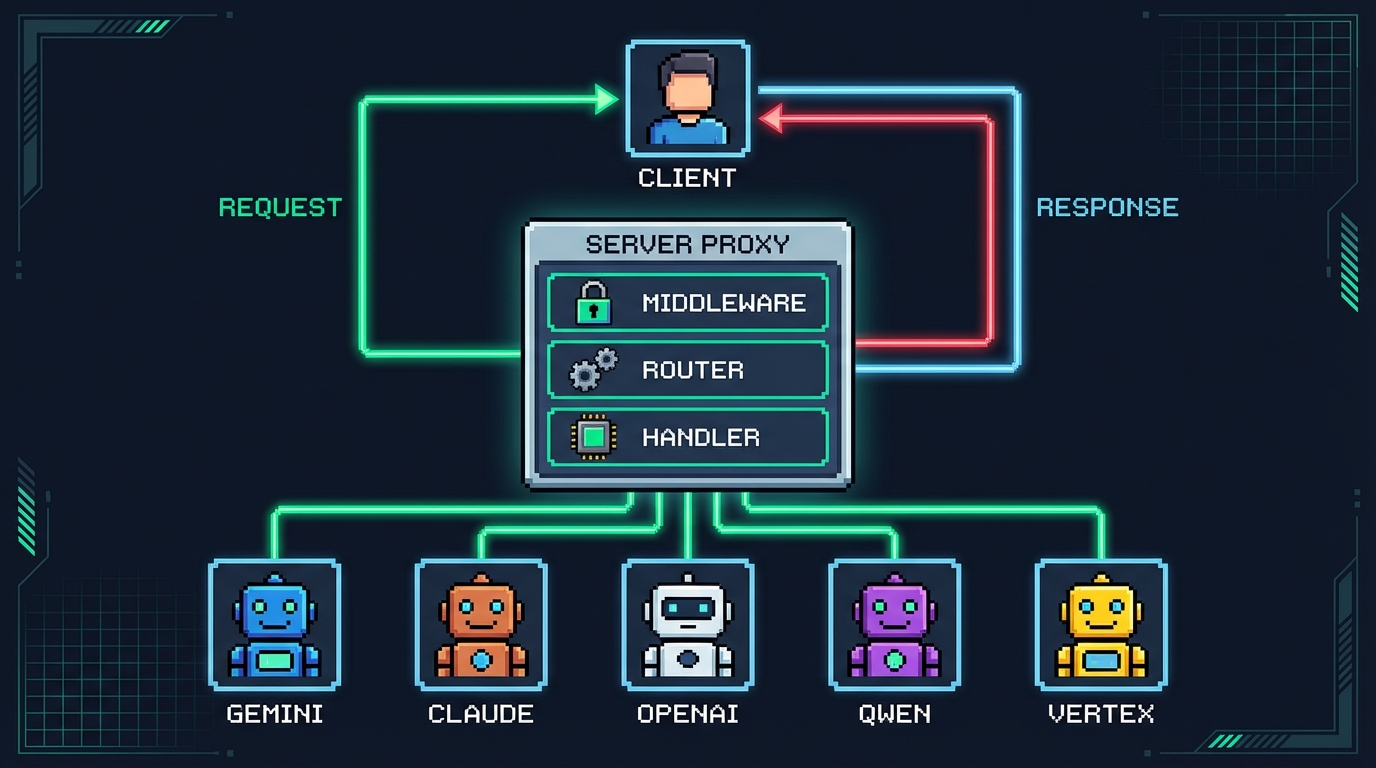
┌─────────────────────────────────────────────────────────────────┐
│                        CLIENT REQUEST                            │
│                  POST /v1/chat/completions                       │
└──────────────────────────┬──────────────────────────────────────┘
                           ▼
┌─────────────────────────────────────────────────────────────────┐
│                     CLIProxyAPI Server                           │
│  ┌─────────────┐  ┌─────────────┐  ┌─────────────┐              │
│  │  Middleware │→ │Model Router │→ │  Provider   │              │
│  │  (API Key)  │  │(gemini-xxx) │  │  Handler    │              │
│  └─────────────┘  └─────────────┘  └──────┬──────┘              │
│                                           │                      │
│  ┌─────────────┐  ┌─────────────┐  ┌──────▼──────┐              │
│  │Usage Logger │← │   Response  │← │Credential   │              │
│  │ (Analytics) │  │ Translator  │  │  Selector   │              │
│  └─────────────┘  └─────────────┘  └─────────────┘              │
└──────────────────────────┬──────────────────────────────────────┘
                           ▼
┌─────────────────────────────────────────────────────────────────┐
│                      AI PROVIDERS                                │
│   ┌────────┐  ┌────────┐  ┌────────┐  ┌────────┐  ┌────────┐   │
│   │ Gemini │  │ Claude │  │ OpenAI │  │  Qwen  │  │ Vertex │   │
│   └────────┘  └────────┘  └────────┘  └────────┘  └────────┘   │
└─────────────────────────────────────────────────────────────────┘
Quy trình:
- Client gọi API với model prefix (vd:
gemini-2.0-pro) - Proxy router xác định provider
- Credential selector chọn account (round-robin hoặc fill-first)
- Request được translate sang format của provider
- Response translate ngược về format OpenAI
- Usage logger ghi nhận metrics
Các tính năng chính
1. Multi-provider Authentication

| Provider | Auth Method |
|---|---|
| Google Gemini | OAuth (multi-account) |
| Anthropic Claude | OAuth + load balancing |
| OpenAI Codex | API Key / OAuth |
| Alibaba Qwen | API Key |
| Vertex AI | Service Account |
2. Dashboard UI
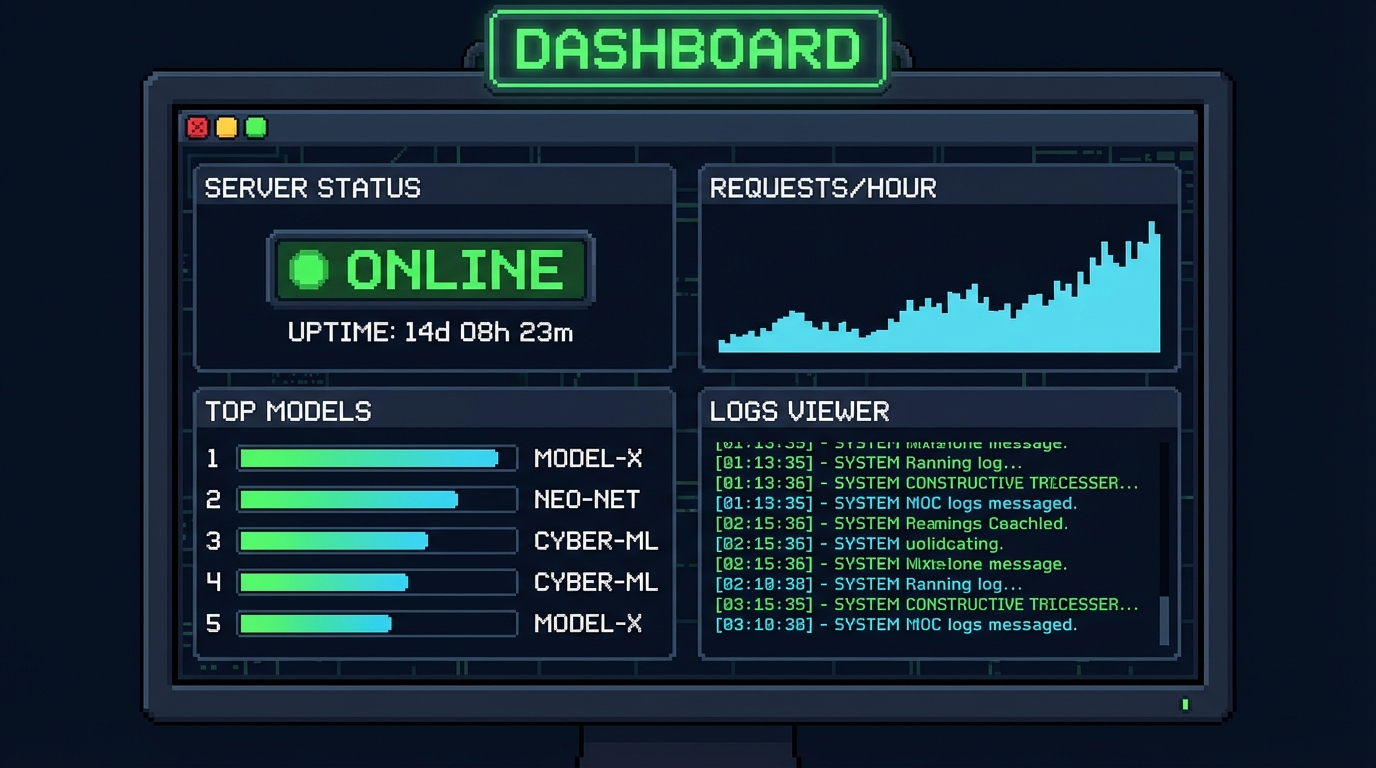
- Overview: Server status, request stats, sparkline charts
- Model Leaderboard: Top 10 models theo usage
- AI Playground: Test models trực tiếp trên dashboard
- Logs Viewer: Real-time request logs với filters
3. Hot-reload Config
# config.yaml - thay đổi không cần restart
routing:
  strategy: "round-robin"  # hoặc "fill-first"

api-keys:
  - "sk-your-client-key"
Cách cài đặt (Docker)
# Clone repo
git clone https://github.com/0xAstroAlpha/cliProxyAPI-Dashboard.git
cd cliProxyAPI-Dashboard

# Copy config mẫu
cp config.example.yaml config.yaml

# Chạy với Docker
docker-compose up -d

# Truy cập dashboard
open http://localhost:8317/static/management.html
Cách sử dụng
Bước 1: Đăng nhập OAuth trên dashboard (Configuration → Account Health)
Bước 2: Lấy API key từ config
Bước 3: Gọi API qua proxy
curl http://localhost:8317/v1/chat/completions \
  -H "Authorization: Bearer sk-your-key" \
  -H "Content-Type: application/json" \
  -d '{
    "model": "gemini-2.0-flash",
    "messages": [{"role": "user", "content": "Hello!"}]
  }'
Bước 4: Monitor usage trên dashboard
Use cases phù hợp
- CLI tools developers: Test nhiều AI models không cần đổi code
- DevOps teams: Quản lý API keys tập trung, rotate tự động
- Cost optimization: Track token usage, so sánh chi phí giữa providers
- Load balancing: Xoay vòng nhiều accounts tránh rate limit
Kết luận
CLIProxyAPI Dashboard giải quyết pain point quản lý AI APIs phân tán:
- Một endpoint cho tất cả providers
- Tự động xoay vòng credentials
- Real-time analytics theo dõi chi phí
- Open-source, tự host, bảo mật
Nếu bạn đang làm việc với nhiều AI APIs, đây là tool đáng thử.
Tài nguyên:
- Dashboard: github.com/0xAstroAlpha/cliProxyAPI-Dashboard
- Core Proxy: github.com/router-for-me/CLIProxyAPI
- Dashboard docs: xem file
docs/DASHBOARD.mdtrong repo
Bài viết hữu ích?
Chia sẻ để nhiều người biết đến!
>_ LLM-Friendly Copy
Copy as Markdown to use with ChatGPT, Claude, or other AI tools


